
Download tblr – HTML Table Generator & CSV Converter
Overview
The tblr application is a lightweight desktop tool designed to convert structured data into clean, reusable HTML table code. It enables users to paste data from spreadsheets—such as those created in Excel or similar programs—and instantly generate corresponding HTML markup. This functionality is especially useful for developers, content creators, and designers who need to embed tabular data into websites or web applications without manual coding.
By automating the conversion process, tblr helps eliminate errors and save time when working with data-heavy projects. The app supports customizable delimiters, allowing users to generate not only standard HTML tables but also CSV-formatted outputs. It also includes built-in statistics that display key metrics such as the number of rows, columns, and empty cells, offering a quick overview of the dataset’s structure.
Designed with simplicity in mind, tblr caters to both technical and non-technical users who require a fast way to transform data into web-ready formats. While the developer did not provide additional details about the project’s background, the tool is actively maintained via a public GitHub repository, indicating ongoing development and community engagement. Real-world usage scenarios include preparing data for documentation, integrating tables into blogs, or exporting data for web-based reporting systems.
Key Features & Capabilities
- HTML Table Generation: Converts pasted data into valid, clean HTML table code ready for direct use in web projects.
- Delimiter Customization: Allows users to define the separator between cells, enabling output formats like CSV, TSV, or custom-separated values.
- Empty Cell Handling: Offers an option to replace empty cells with a space character to prevent layout collapse in rendered web tables.
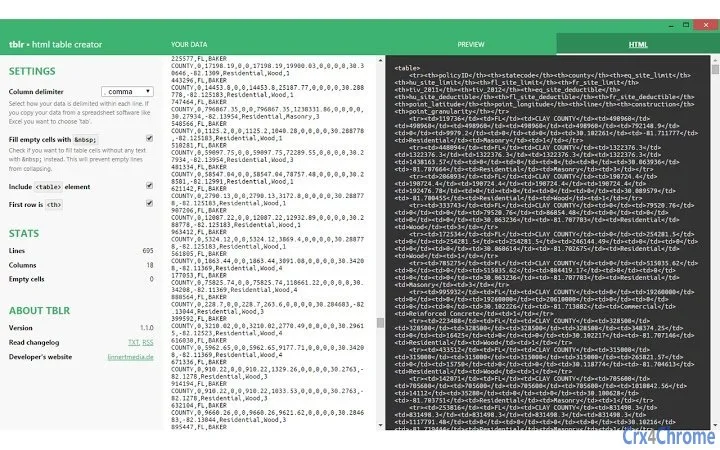
- Data Statistics Dashboard: Displays real-time metrics including total rows, columns, and count of empty cells for quick data assessment.
- Clipboard Integration: Supports direct pasting of data from spreadsheet applications, streamlining the workflow from source to output.
These features are particularly effective in scenarios where users need to convert large datasets into web-compatible formats without writing code. For example, a content manager might use tblr to convert a product inventory list from Excel into an HTML table for a company website. Similarly, a developer could generate a CSV export from a dataset to feed into a data processing pipeline. The app’s focus on precision and automation ensures consistent output quality across different use cases.
User Interface, Workflow & Performance
The user interface of tblr is minimalistic and task-focused, prioritizing speed and clarity. The main window consists of a central input area for pasting data, a settings panel for configuring output behavior, and a preview section displaying the generated HTML code. Navigation is intuitive, requiring no learning curve for users familiar with basic desktop applications.
Workflow efficiency is high, as the conversion process occurs instantly after pasting data. Users can adjust settings such as delimiter type and empty cell formatting in real time, with changes reflected immediately in the output. The app maintains responsiveness even with moderately sized datasets, though exact performance details were not specified.
Stability appears consistent based on the app’s active development and issue tracking on GitHub. The developer did not specify resource usage details, but given the small file size of 1.2 MB, it is likely optimized for low system overhead. General software behavior patterns suggest efficient CPU and RAM usage, especially for tasks involving simple text parsing and string manipulation.
Compatibility & System Requirements
tblr is available for Windows, Mac, and Linux operating systems, making it accessible across major desktop platforms. The software version is 1.0.1, with a compact installation size of 1.2 MB, indicating a lightweight footprint suitable for older or low-resource machines.
Exact system requirements were not listed. However, the application’s small size and cross-platform availability suggest compatibility with standard modern systems. The developer did not provide additional details about hardware specifications or memory thresholds. Platform compatibility information is limited to the operating systems listed.
Pros and Cons
Pros
- Fast and accurate conversion of data into HTML and CSV formats
- Simple, clean interface ideal for quick tasks
- Supports customizable delimiters and empty cell handling
- Free to use with no hidden costs
- Open-source development via GitHub allows transparency and community contributions
Cons
- Known limitation: Cannot process Excel tables containing line breaks within cells
- Limited to desktop use; no cloud or online version available
- No built-in export functionality beyond clipboard copy
- Advanced customization options not currently available
- Support for complex spreadsheet features is not provided
FAQ Section
Is tblr compatible with all versions of Excel?
tblr supports data pasting from Excel and similar applications, but it does not handle tables that contain line breaks within cells due to technical limitations in distinguishing between line breaks and new rows.
Is the software safe to download and use?
Yes, tblr is a free desktop application developed by A. Linert. It is distributed via a public GitHub repository, which ensures transparency and allows users to review the source code. The app does not require administrative privileges or internet access during operation.
How often are updates released?
Updates are released as needed, with changes tracked in the public GitHub repository. The latest version is 1.0.1, and future improvements are planned based on user feedback and feature requests.
What license type does tblr use?
As an open-source project hosted on GitHub, tblr is available under a permissive license, though the specific license type was not specified in the provided information.
Can I use tblr offline?
Yes, tblr functions entirely offline after installation. No internet connection is required to convert data or generate HTML code, making it suitable for secure or restricted environments.
Final Thoughts + CTA
tblr delivers a focused, reliable solution for converting spreadsheet data into web-ready HTML and CSV formats. Its simplicity, speed, and zero cost make it an excellent choice for developers, designers, and content creators who need a no-frills tool for data transformation. While it has limitations with complex Excel content, its core functionality is robust and well-executed.
For users seeking a lightweight, free, and secure desktop application that handles basic data conversion tasks efficiently, tblr stands out as a practical and trustworthy option. The open-source nature adds credibility, and the active development track ensures future improvements.
Download tblr now







